

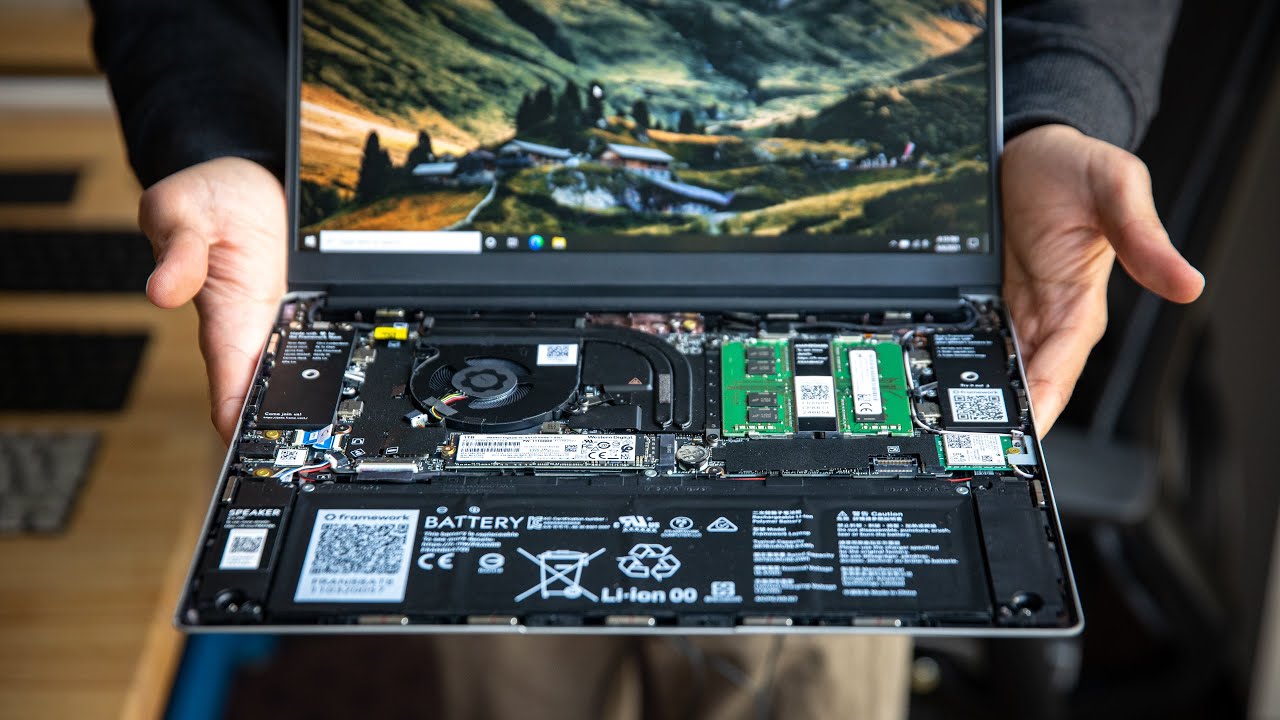
A field computer may need to perform several roles throughout its working life. It might begin as a reporting laptop, later connect to diagnostic hardware, and eventually require cellular access or additional storage. The Panasonic FZ-56 addresses these changing requirements through configurable hardware, expansion areas, display choices, and wireless options. This approach allows organizations to choose a computer based on actual workflows rather than accept a fixed consumer configuration.
Select Processing Power Based on the Workload
The FZ-56 is available with Intel Core Ultra 5 235H vPro and Intel Core Ultra 7 265H vPro processors. Both options are intended for professional computing, but they suit different levels of demand.
A Core Ultra 5 configuration may be appropriate for field reporting, work-order management, mapping, video calls, document processing, and general business applications. Employees who run complex analytical software, several demanding programs, or processor-intensive technical tools may benefit from a Core Ultra 7 model.
Processor selection should reflect the applications employees use every day. Purchasing more computing power than necessary increases the initial cost, while choosing too little can affect productivity throughout the device’s service life.
Choose Between Touch and Non-Touch Displays
Different users interact with laptops in different ways. Office-based employees may prefer a traditional keyboard and non-touch display. Field inspectors, technicians, and public-safety personnel may need to select controls, enter information, or review diagrams directly on the screen.
The available non-touch FZ-56 models feature a 14-inch WUXGA display rated at 350 nits. This option may suit indoor environments, vehicles, offices, and sheltered work areas where direct sunlight is not a constant concern.
Touch configurations feature a 14-inch WUXGA display rated at 1,000 nits with gloved multi-touch support. Greater brightness can improve outdoor visibility, while gloved touch input allows employees to use the screen without repeatedly removing protective gear. A stylus and tether can also be selected when more precise input is required.
Organizations should assess where the computer will be used before choosing a screen. Brightness, touch support, and glove compatibility may be essential for outdoor teams but unnecessary for employees who primarily work indoors.
Plan Memory and Storage Carefully
Base configurations include 16 GB of memory and a 512 GB OPAL solid-state drive. Memory can be increased to 32 GB or 64 GB, while primary storage options include capacities up to 4 TB.
Memory requirements depend on software use and multitasking. Employees who work with large databases, design files, analytical tools, or multiple virtual applications may need more than the base amount.
Storage decisions should account for files that must remain available without an internet connection. Maps, training videos, inspection photographs, technical manuals, and locally stored databases can consume significant capacity. Organizations should also consider retention policies and whether employees transfer completed files to a central server.
Use Expansion Areas for Specialized Tasks
One of the FZ-56’s most practical characteristics is its selection of configurable expansion areas. These areas allow organizations to add hardware based on the job rather than rely on external adapters.
The universal bay can accommodate options such as a smart-card reader, DVD drive, Blu-ray drive, secondary solid-state drive, or barcode reader. The right-side expansion area can support fingerprint readers, a contactless smart-card reader, an insertable smart-card reader, or a second battery.
Rear expansion choices include combinations featuring VGA, a true serial port, USB connections, a second Ethernet connection, USB-C, microSD, or higher-speed LAN connectivity.
These choices can be valuable in manufacturing, utilities, automotive diagnostics, logistics, healthcare, and government work. A true serial port may connect with established industrial equipment, while a barcode reader can assist with inventory and asset management. An additional network port may support specialized systems or secure wired connections.
Consider Cellular Connectivity and GPS
The FZ-56 includes Intel Wi-Fi 7 in its listed configurations. Buyers can also choose models with 4G or 5G mobile broadband, with dedicated GPS offered on selected configurations.
Cellular access can help employees receive work orders, submit reports, access cloud platforms, and communicate when workplace Wi-Fi is unavailable. Dedicated GPS can support navigation, location records, dispatch operations, and mapping tools.
Before selecting a mobile broadband configuration, buyers should confirm network coverage, carrier requirements, data-plan costs, and compatibility with their organization’s communication system. Teams working in remote areas should not assume that the latest modem will compensate for limited carrier coverage.
Address Security at the Hardware Level
Professional and government users may require stronger access controls than a conventional password. Available FZ-56 modules include fingerprint readers, contactless smart-card readers, and insertable smart-card readers.
These features can support organizational identity systems and controlled access procedures. TPM 2.0 and Intel vPro are also included in the listed configurations, providing capabilities that may assist IT teams with security and device administration.
The security hardware should be selected in consultation with the organization’s IT department. Compatibility with identity cards, authentication software, operating policies, and management tools must be confirmed before deployment.
Prepare for Long Shifts and Vehicle Use
A second battery can be installed through the right-side expansion area. This may benefit technicians, inspectors, emergency personnel, and other users who work extended shifts away from electrical outlets.
Additional AC and vehicle power adapters are also available. Organizations operating a fleet should plan where computers will be charged and whether employees need adapters at desks, depots, homes, or vehicles.
The Panasonic FZ-56 allows buyers to match the computer to the user’s duties through processor, display, memory, storage, broadband, security, and expansion choices. For configuration guidance, current availability, or help selecting suitable modules, visit Tough Rugged Laptops and request a system built around your organization’s field requirements.
